September 9th, 2025
New
Improved
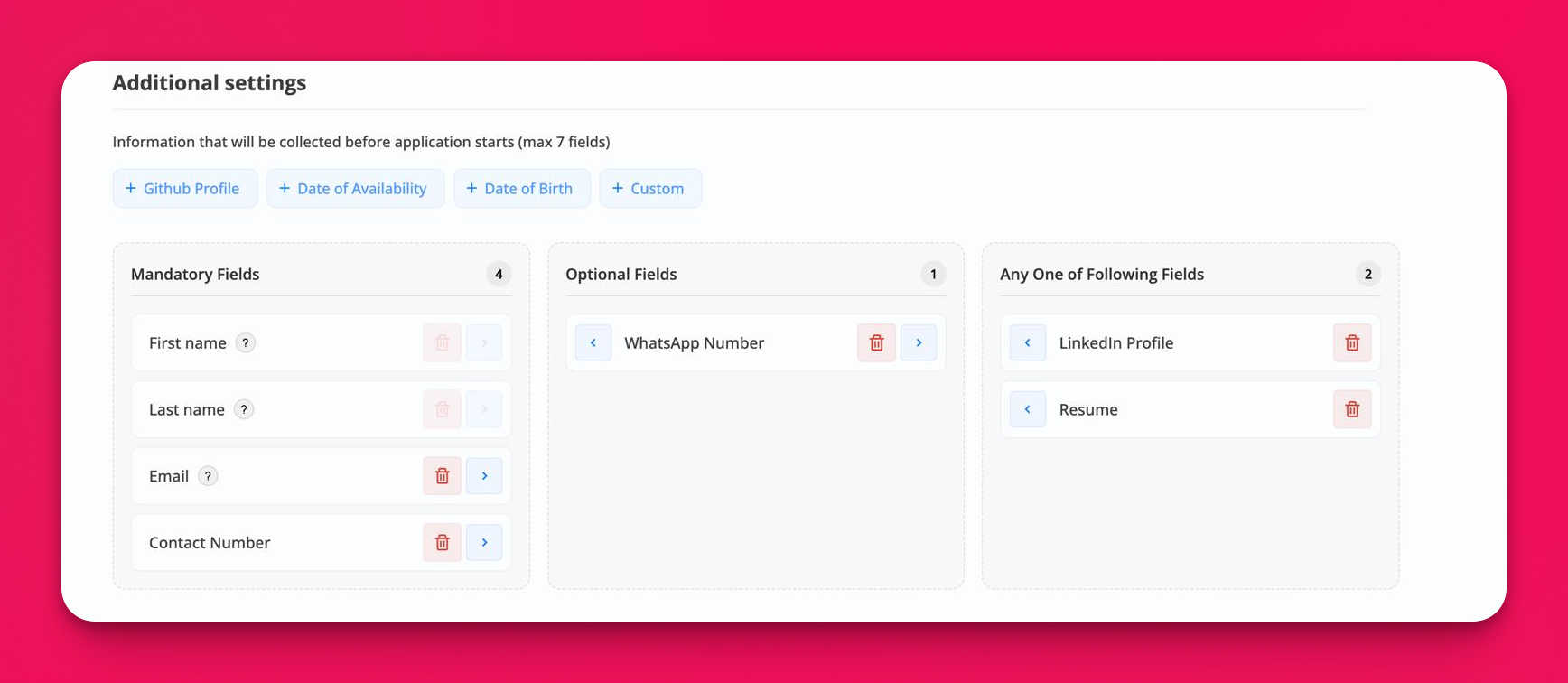
Flexible pre‑apply information collection
WhyIncrease apply conversions while capturing the right signal up front. You can now control which fields are required, optional, or alternatives so candidates don’t drop off when they don’t have a specific document handy.
What’s newRequired vs Optional (replaces simple on/off)
Move fields into “Mandatory” or “Optional.” Candidates must complete all Mandatory fields before starting the application.
"Any one of the following" group
Let candidates proceed by completing any one field from this group (e.g., LinkedIn OR Resume). Great for mobile users or early‑funnel roles.
More standard fields
Added LinkedIn Profile, GitHub, Date of Birth, Date of Availability, and WhatsApp Number.
Existing fields remain: First name, Last name, Email, Contact Number, Resume, plus Custom fields.
Usability
URL/phone validation and date pickers.
Limit of 7 total pre‑apply fields to keep friction low (counter shown in UI).
Also added to Delayed Invites
The same Mandatory / Optional / Any‑one controls and new standard fields are available on the Delayed Invites settings screen.
Use them to collect only the essentials before the invite is sent, then schedule the video‑interview email to go out after your chosen delay.
Where
Job → Edit Job → Additional settings → “Information collected before application starts.”
Job → Settings → Delayed invite.
Migration
Your previous selections are preserved. Fields that were enabled are placed in Mandatory by default; disabled fields stay off. Review once to take advantage of Optional/Any‑one settings.
Tips
Common pattern: Mandatory = First/Last name, Email; Optional = Contact/WhatsApp; Any‑one = LinkedIn OR Resume.
Fewer fields = higher completion. Use “Any one of” to reduce drop‑off without losing signal.