March 30th, 2026
New
Stop spending time reviewing applications that don't meet your basic requirements. With Auto-disqualify, applicants who fail any must-have scoring criteria are automatically filtered out before they ever reach your review queue.
How it works:
In the Add / Edit Job page, navigate to the Scoring section and enable Scoring for Standard Responses.
For the questions you've added, set scoring criteria and mark the critical ones as Must Have.

Toggle on Auto-disqualify Applicants. Any candidate who fails a must-have condition is stopped before the media questions and moved straight to the Disqualified tab. Disqualified applicants don't count towards your monthly limits.

Optionally, set up a Disqualified applicants email template under Emails / SMS to notify them automatically. You can add a delay (in hours) before the email goes out.

Why this matters:
If you're hiring for a role with hard requirements - minimum experience, availability by a specific date, location, or anything else you no longer have to sift through applicants who clearly don't qualify. Only candidates who clear all must-have criteria make it to your review queue.
March 27th, 2026
You can now permanently delete a job from Hirevire, along with all its applications, email templates, and scorecards.
Previously, archiving was the only way to remove a job from your active list. Now, if you want a clean slate, delete does exactly what it says.
How it works:
Open any job from your dashboard.
Click the three-dot menu (⋮) in the top right corner.
Select Delete from the dropdown.

What gets deleted:
The job and its settings
All candidate applications and video responses
Associated email templates
Any scorecards tied to that job
This action is permanent and cannot be undone, so use it only when you're sure.
March 26th, 2026
Improved
Your custom domain now verifies its DNS configuration before going live, so candidates always land on a working link.
What's New
DNS configuration guide right in the Domains settings. You'll see the exact CNAME and TXT records to add, with copy-to-clipboard values.
Domain verification status shows whether your custom domain is correctly configured. If DNS isn't set up yet, application and career page links fall back to the default
app.hirevire.comdomain.Inline warning on the job's share link if your custom domain isn't verified yet, so you know

Where
My Account → Domains
How It Works
Add your custom domain (e.g.,
careers.yourcompany.com) in Domains settings.Copy the DNS records shown on screen and add them to your DNS provider. You'll need a CNAME record and a TXT record for verification.
Wait for propagation. DNS changes and SSL certificate generation may take a few minutes.
Check the status badge. Once verified, your application and career page links will automatically use your custom domain.

Notes
Until DNS is verified, all links default to
app.hirevire.com. Candidates won't hit a broken page.Domain propagation and SSL certificate generation may take a few minutes after adding DNS records.
March 25th, 2026
Improved
Reviewing a candidate's video response no longer means staying glued to one spot on the page.
When you scroll past a video while it's playing, it automatically pops into a Picture-in-Picture window so you can keep watching while you read through the rest of the submission, text answers, uploaded resume, and all.

How it works:
Open any candidate submission and play a video response.
Scroll down to review other answers.
The video floats into a small Picture-in-Picture player automatically, no extra clicks needed.
When you scroll back up, it snaps back into place.
March 24th, 2026
You now have more control over what your team members can do in Hirevire.
What's New
Previously, team members could only be given access to All jobs or Specific jobs. Now, you can assign two new roles when inviting or managing team members:
Admin: Access to all present and future jobs, plus the ability to manage career page, custom domains, integrations, and invite other team members.
Billing Admin: Everything an Admin can do, plus access to billing and subscription settings.
The existing access levels (All jobs and Specific jobs only) continue to work as before for team members who just need job-level access.

Where
Account Settings → Team Members → Invite team member
Notes
Available on Professional and Agency plans.
Existing team members retain their current access. You can update their role at any time.
March 12th, 2026
Fixed
Previously, the response view only showed fields that were currently being collected on the job. If you removed or changed a field after candidates had already submitted, their responses for that field would disappear from view.
Now, all collected fields are displayed on each response, regardless of whether the field is still active on the job.
February 28th, 2026
Improved
Search across everything, not just names.
Until now, search only matched candidate names and email addresses. Deep Search changes that completely. You can now find candidates using plain English queries across all your jobs, searching through video response transcripts, resume content, uploaded files, notes, and application responses.

How It Works
Enable Deep Search in My Account → Deep Search. Toggle it on and it activates instantly.
Search from your dashboard. Type any query in the search bar. Try things like "QuickBooks experience", "5+ years in outbound sales", or "candidates who mentioned remote work".
Review results across all jobs. Each result shows the candidate name, where the match was found (transcripts, notes, resume, etc.), and a match percentage so you can quickly prioritize.

What gets searched
Video response transcripts
Resume content
Multi-format application responses
Notes added by your team
Uploaded files
Notes
Deep Search is available on the Agency plan.
Enable it from My Account → Deep Search.
February 26th, 2026
Improved
When sharing a candidate's application via a no-login link, you can now choose whether to include follow-up question responses.
Toggle "Include followup questions" in the Share Application dialog to control what reviewers see. Useful when you want external stakeholders to focus only on the original screening responses.

February 20th, 2026
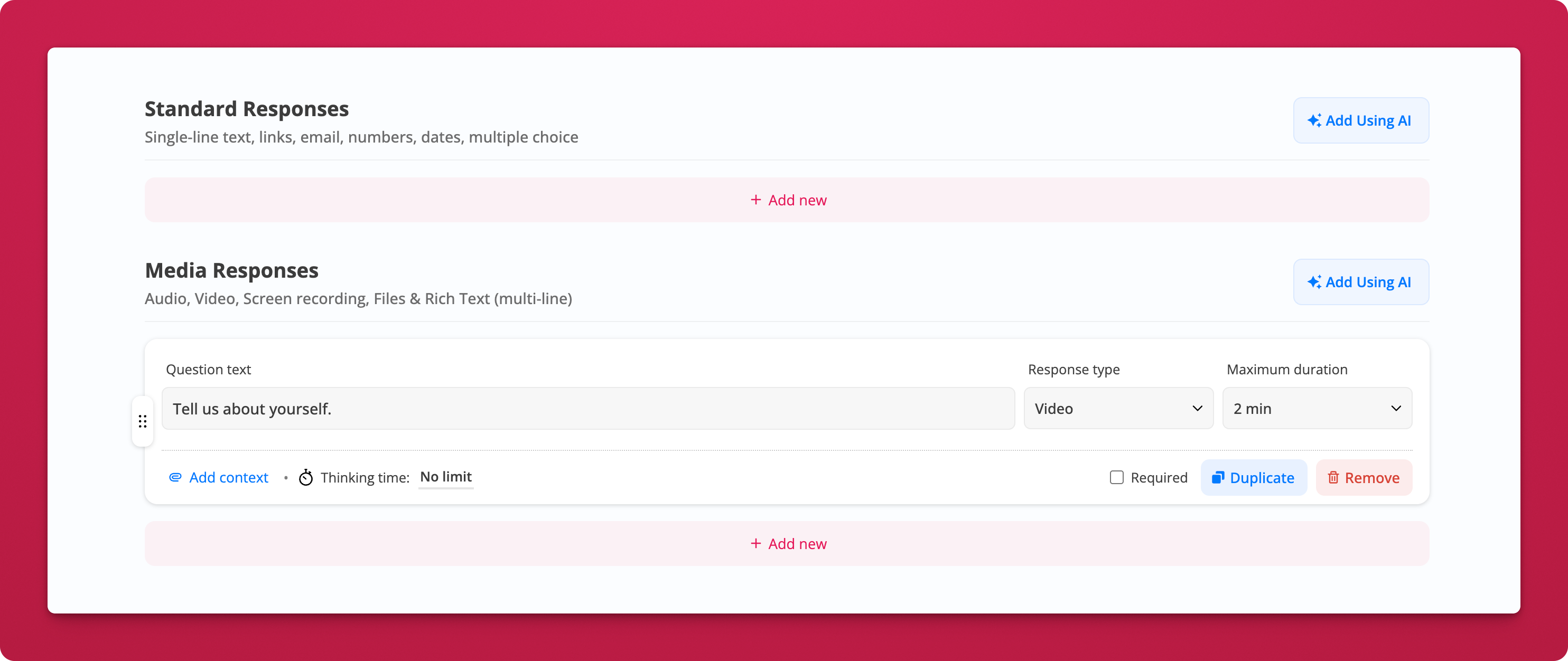
Stop staring at a blank question list. You can now generate tailored interview questions with one click using AI.
What's New
AI-generated questions for any role. Once you've set a job title, click "Add Using AI" to instantly generate relevant screening questions. AI uses your job details and company context to suggest questions that actually make sense for the role.
Works for both question types. Generate Standard Response questions (text, email, links, dates, multiple choice) and Media Response questions (video, audio, screen recording, file uploads, rich text) separately, so you get the right format for each question.
How It Works
Enter your job title in the job editor
Click "Add Using AI" next to either Standard Responses or Media Responses
Review the generated questions. Edit, reorder, remove, or add more as needed.
Each generated question comes with a suggested response type and duration, so you can start collecting applications right away.
Notes
You need a job title set before AI generation is available.
Generated questions are fully editable. Treat them as a starting point, not a final draft.
February 20th, 2026
New
You asked, we built it. One of our most-requested features is now live — you can now send follow-up questions directly to individual candidates after reviewing their initial submission.
The problem it solves
Sometimes a candidate's answer sparks a new question. Maybe they mentioned an interesting project you want to dig into, or skipped a question you really needed answered. Now you can go deeper — without scheduling a call.
From any candidate's application, simply click "Ask Follow-up Questions" and send them a new set of questions via email. Candidates respond asynchronously, just like the original interview.
How it works
Review a candidate's responses in their application panel
Click "Ask Follow-up Questions" at the bottom of their response view

Compose your follow-up — add an optional intro video (record or upload), write a message, and add one or more questions

Set response type and duration — video, text, or other formats with configurable time limits
Hit Send — the candidate receives a branded email with a link to respond
You can also customize the follow-up email template (sender, reply-to, subject, CC) from your job's Emails / SMS settings.

Why this matters
Go deeper on promising candidates — clarify vague answers or explore interesting threads without burning calendar time on a live call
Keep hiring fully async — your whole team stays aligned without needing to sync schedules
Reduce mis-hires — gather the exact information you need before making a shortlisting or offer decision
Better candidate experience — candidates respond on their own time, reducing pressure and improving response quality